
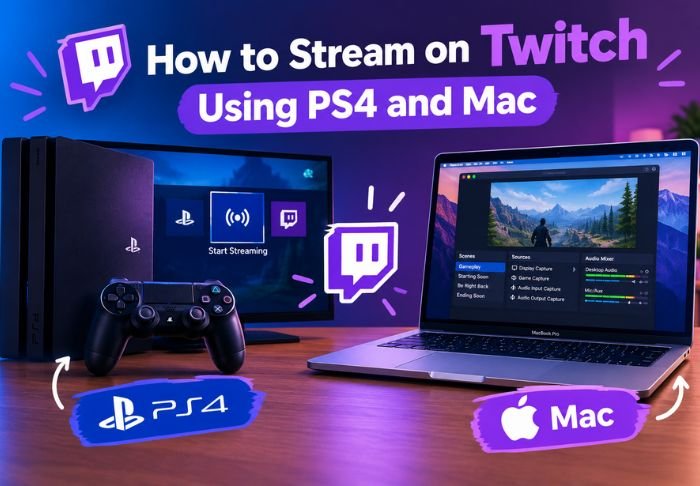
There are different methods to stream on Twitch Using PS4 and Mac. Each approach has different hardware, software and procedures to get a stream up and running.
- It’s good to note PS4 has built-in methods for streaming, and thus doesn’t require additional software for the process.
- For Macs, you’ll need to use a different piece of software like OBS for streaming.
- Both methods rely on the stream key to connect to Twitch.
Which method you use depends on your individual situation. For other platform-specific guides like this, the TwitchTV team covers a variety of topics beyond the daily puzzles.
What You Need to Know First: Streaming Twitch Using PS4
Compared to streaming on a computer, streaming Twitch using PS4 is surprisingly simple. That’s because the PS4 has built-in capabilities for streaming and thus, doesn’t require external software. To get started, you just need a PS4 and Twitch account and you’re good to go!
To get streaming:
- Connect your PS4 to the internet via Wi-Fi or Ethernet
- Create a Twitch account and link your account to your PS4 via the settings
- Prepare a PlayStation Camera or capture card if you want to include face cam (Not required)
With the basics in place, you’re just a few buttons away from streaming on your PS4.
How to Stream Twitch Using PS4: Step by Step
To start your broadcast, just hit the ‘Share’ button on your PS4 and follow the on-screen prompts to connect to Twitch. After that, you just start broadcasting.
That’s it! Now you know how to stream Twitch using your PS4!
How to stream on Twitch Using PS4:
- While in a game, press the share button.
- Select ‘Broadcast Gameplay’.
- Choose Twitch as your destination.
- Log in and link your Twitch account if you haven’t already.
- Add a stream title and select ‘Start Broadcasting’.
This method works well for quick Twitch broadcasts from your PS4, but can lack the customization features that a PC or Mac setup can offer.
How to Stream on Twitch Using Mac: What You’ll Need
Macs lack built-in streaming tools, so you will have to use third-party software. One of the most popular options is OBS Studio which is free.
There are other options for Twitch streaming with a Mac including:
- OBS Studio
- Streamlabs (based on OBS)
- XSplit (premium)
The community support and resources for OBS Studio for macOS makes it the first choice for a lot of users.
How to Stream on Twitch Using Mac: Step by Step
After you’ve got your software, the process of setting up streaming on Mac is similar to PC. There are just Mac-specific permissions you will have to allow for your camera and microphone.
To stream on Twitch using Mac:
- Download and install your streaming software. We suggest OBS Studio.
- Go to your Mac’s system preferences, and give your microphone, camera, and screen recording permissions.
- Go to your Twitch Creator Dashboard and copy your Stream Key.
- Paste your key in your streaming software.
- Click start streaming!
If you are streaming using your PS4, you don’t need to set it up. Your PS4 does the work for you. The tradeoff is you have less control over your stream.
PS4 vs Mac: Which Method Should You Choose?
Deciding between streaming on Twitch using PS4 or streaming on Twitch with a Mac really comes down to what you’re already using to play or create content. Each has distinct trade-offs.
Key differences to consider:
- PS4 streaming is simpler but offers fewer customization options
- Mac streaming requires more setup but allows custom overlays, scenes, and alerts
- PS4 is better for console gameplay; Mac works better for broader content like art or talk streams
If you’re only streaming console games casually, PS4’s built-in tools are enough. For more control over layout and production quality, streaming on Twitch with a Mac is usually worth the extra setup time.
Conclusion: Twitch Using PS4 and Mac
Both streaming methods are good for different things. There can be tradeoffs. Deciding between the two comes down to what you are streaming or using to make content.
FAQs: Twitch Using PS4 and Mac
Q: Can you stream on Twitch using PS4 without a PlayStation Camera?
You can definitely stream without a PlayStation Camera. You can broadcast just your gameplay using your console’s built-in sharing features.
Q: Does streaming on Twitch with a Mac require a high end computer?
A mid range Mac can stream the majority of games just fine, but more demanding titles may need more powerful hardware.
Q: Can PS4 streams include webcam overlays like Mac streams?
Yes, the PlayStation Camera supports basic camera overlays, just like a Mac. However, the software on the PS4 is more limited compared to Mac software.
Q: Is OBS Studio free for Mac?
OBS Studio is completely free and open source, and available on macOS with no hidden costs and no premium tiers.
Q: Is a Twitch account required to stream from PS4 or Mac?
Yes, you do need a Twitch account to link and authenticate your stream in order to go live.
Also Read: How To Cancel Twitch Subscription


Leave a Reply